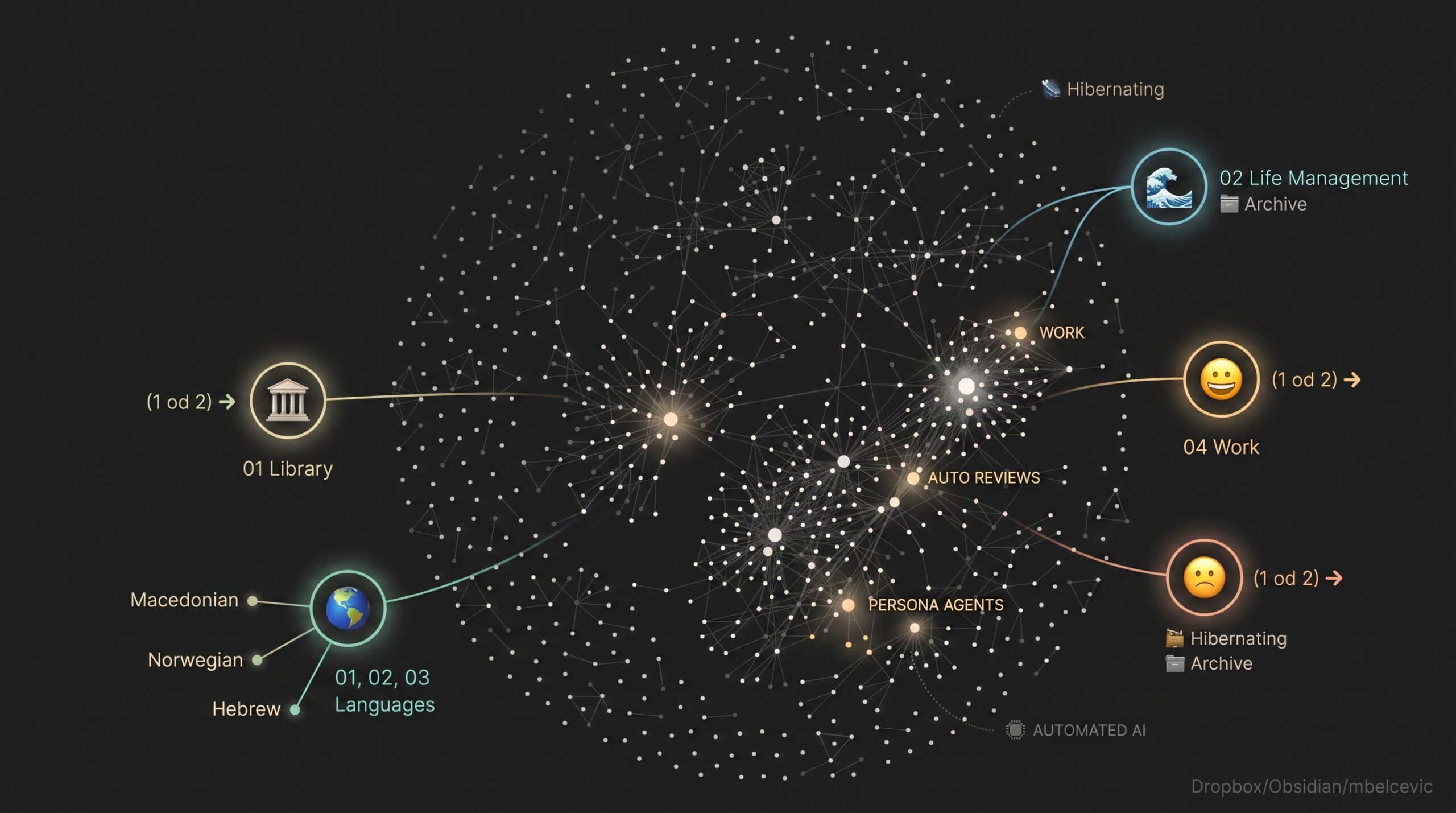
For almost a decade, I’ve been using different systems for knowledge management, work and life management, and everything in-between. Building systems grounds me and helps with sensemaking, especially when I’m going through tectonic changes (starting/ending a big project, moving, losing/changing job etc.). With time, I built – or better said grew, like a garden – a life operating system.
Second brain or second job?
Most knowledge management systems fail for a simple reason: they demand more energy to maintain than they give back. When your second brain feels like a second full-time job, you stop updating it.
Iterating incrementally, I went from different note making tools (Evernote, Notion, Confluence, Drive, Roam Research…) to Obsidian. From different life/project management systems (GTD, Scrum, OKRs, Now – Next – Later, PARA, Interstitial Journaling) to a modified Personal Kanban with strong journaling. Lately, I’ve obviously sprinkled AI into the mix…
Here’s how the system looks and works today.
Architecture note: The cron jobs and Openclaw bot run on my Mac Mini, and they are editing files on Dropbox (which I also edit on my Macbook or Linux laptop). Files are as basic .md as possible – I use no Obsidian plugins and conciously keep things vanilla as a way of futureproofing. Openclaw is my agent harness of choice, and I communicate with my agent via Telegram. Besides Anthropic Claude models, I also subscribe to Google Gemini, and run Qwen on Ollama locally
Sensemaking and life navigation (now with AI automation)
Right now I’m doing a full-time job, PhD, a side project, gym, and new languages. Same hectic mess as last time, and same Milos. The system has evolved, though.
Some previous, related blog posts capturing earlier systems and the way I used to do things (newer first)
From Chaos to Context: A Roadmap for Traversing Life with Kanban and Journaling
Navigating time and tasks (Planning with flexibility)
v2: Updated Workflow for Academic Writing and PhD Studies in Obsidian
What has changed?
Compared to previous systems, there are a few changes.
1. Everything has moved to Obsidian…
I don’t do any task management software, and write and track my daily tasks in daily notes. I also use ‘Library’ folder to keep files (e.g. books or articles) with their metadata.
2. …but, there is per-project flexibility
I may use Word with Zotero for writing an article; Google Slides for presentation and so on. I don’t force it if other tool(s) work better for a purpose at a given time. I will move the files to the vault when done though, and also have ‘index’ note.
3. There is ‘indexing’ and ‘working’ mode
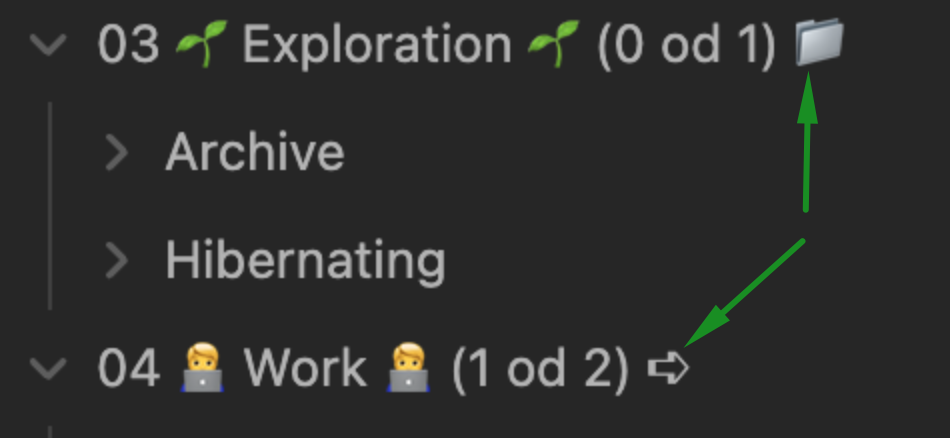
For different sections, I use ‘indexing’ and ‘working’ mode. If it’s ‘indexing’ I will describe the item and keep just a single note. If it’s ‘working’, I will have a folder and actively work inside that folder in Obsidian on the given item(s). [This will be clearer later with examples]
4. There’s ‘archive’, ‘hibernating’ and ‘active’ mode
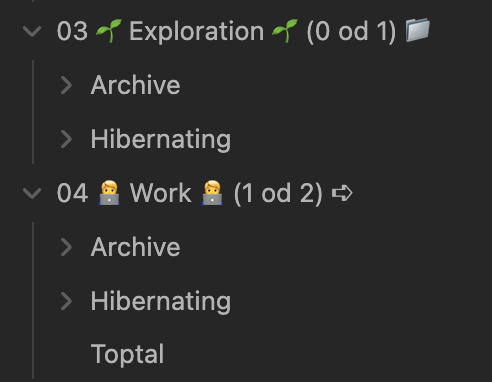
Each section has folders for ‘archive’ and ‘hibernating’ or an option to add items directly in the root folder for ‘active’. ‘Archive’ is done and finished; things I don’t plan to revisit. Hibernating’ is currently on hold (not active, but not archived either).
Work has an ‘archived’ folder (with jobs I don’t plan to revisit), a ‘hibernating’ (currently on hold, could be revisited) and one active item (in the root folder for work)
5. WIP limits visible and enforced in Obsidian
My WIP limits are now explicitly listed at section level, and the number of files or folder reflects them. (In the work section, I have 1 active note – ‘Toptal’, and so the limit is 1 out of 2 / 1 od 2).
6. LLM-based benefits
Besides using LLMs to analyze my data, I use Openclaw and Claude Code to automate certain workflows, or have AI do the grunt work for me, or have it prompt me to journal asking questions in Telegram every evening (and then add my responses to the appropriate entry).
Symbols & grammar
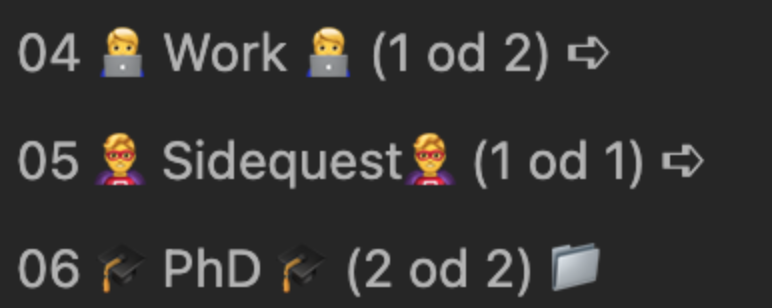
📁 or ➪ folder
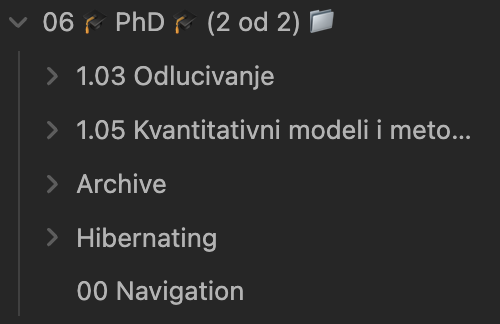
A 📁 folder is one I work inside — multiple files, subfolders, drafts. 06 PhD looks like this: a folder per subject, plus a 00 Navigation.md on top to keep me oriented.
An ➪ folder is an index. One file per thing, and the file mostly points elsewhere. 04 Work is a single Toptal.md; 05 Sidequest is a single Katastar.ai.md. The real work lives in Jira, in a repo, in someone else’s tool — the note just holds the thread.
The marker tells me, and the agent, how much to expect: nobody should go looking for depth in an index folder, and nobody should trust a working folder to be tidy.
(1 od 2) – WIP limits in the name
od is Serbian for of. So (1 od 2) is 1 out of 2. One in progress, two allowed.
(2 od 2) on PhD means I’m at the cap: nothing new gets pulled in there until something ships or goes to sleep. The Library gets (♾️), because a library shouldn’t have a WIP limit — books aren’t work in progress.
03 Exploration says (0 od 1). The folder contains nothing. That’s not a bug I’m about to fix; it’s an accurate readout of how much bandwidth I’ve had for exploring lately, printed where I can’t miss it. There’s a potential allowance for one item, but I am not exploring anything at the moment.
The WIP limit is visible every time I open the file tree. No dashboard, no query. Just the name of the thing.
Active, Hibernating, Archive
Almost every top-level folder carries the same three states:
loose in the root folder = active
Hibernating/ = not active but not dead
Archive/ = done
The middle one is the one I’d defend hardest. Before it existed, everything was either alive or finished, which meant a paused project stayed in my face and quietly generated guilt every time I opened the vault. Hibernating says: this was real, it isn’t dead, and it is not asking anything of me this week. Naming that state took more weight off my shoulders than any app I’ve ever installed.
Sections
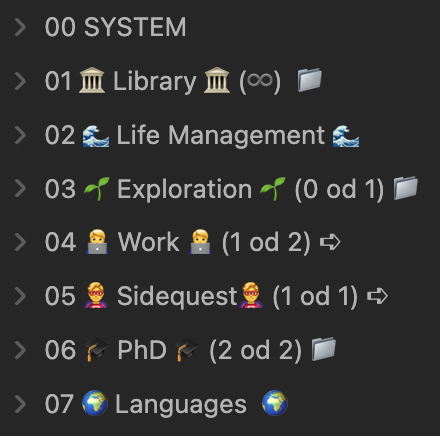
01 🏛️ Library 🏛️ (♾️) 📁
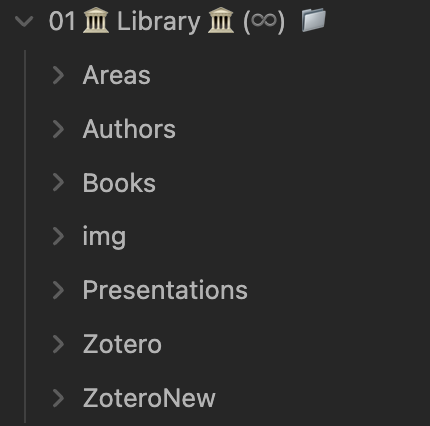
Books, Authors, Areas, Presentations, and two Zotero folders. Around thirty book folders now. The usual PM shelf and the usual PhD shelf. The Library sits outside the WIP system on purpose: it’s input, not output. Nothing in it is a task, and nothing in it is late.
I am looking into reorganizing the library, and using Claude to do it.
02 🌊 Life Management 🌊
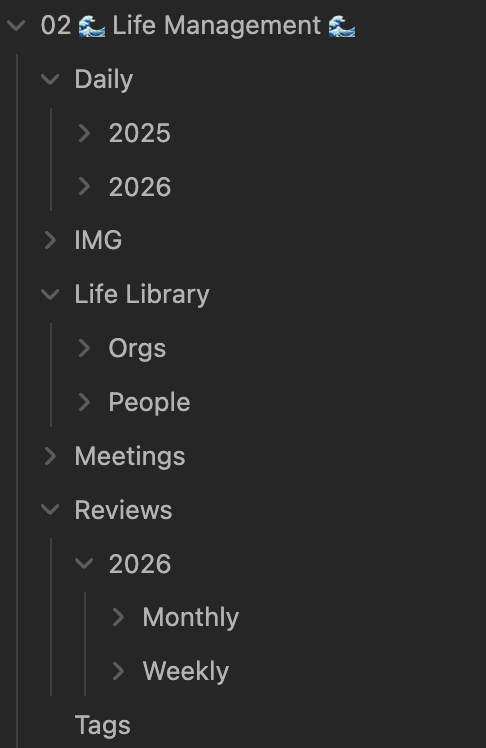
Daily/ is dated all the way down: Daily/2026/2026-08/2026-08-28.md. Every note has the same skeleton — what I want to achieve, the 2 stones, tasks tagged by area, calendar events, and an evening journal block: gave me energy / took my energy / 3 things I am grateful for / mood. Task status is four emojis —> 🟢 done; 🟡 partial; 🔴 cancelled; 🔵 delayed. And the carry-forward rule is executed by AI: 🔵 and unmarked items get moved to tomorrow; the rest don’t.
Tags.md is a document, not a tag list. Each focus area gets a paragraph on what belongs in it and, more usefully, what doesn’t: #gym is physical, #wellbeing is inner work, #odmor is rest. Kept apart so the signal doesn’t blur. Plus #main-job, #doktorske, #ucenje, #freelance, #sidequests, #socialising, #admin, and a #mademehappy tag that exists purely so good days leave a trace.
Life Library/ is my index of people and organisations. Much like books or articles, different people and organizations have a place in my system. I don’t have entries/files for friends or family though – it’s all work, collab, academia etc. It always felt off to add them into ‘CRM’ / PKM or other system.
The reviews (where I’m behind)
In my vault there is: twenty weekly reviews this year. Four monthly. No quarterly folder. No yearly folder.
Worse: all my monthly review files still have [Leave blank for user to fill in] sitting in different sections, staring back at me. The agent assembles the data: week by week, mood curve, task statistics… Then honestly hands the reflection back to me, and I haven’t always shown up for it. (More like – almost never.)
Fixing that cadence is the current project: weekly (habitual), monthly (assembled but under-answered), then quarterly and yearly, which don’t exist yet and probably matter most. A PhD and a career don’t move on a weekly clock.
03 🌱 Exploration 🌱 (0 od 1) 📁

Things I’m learning. Grouped in hibernating, archive and active. Working folders. Reserved for a topic outside PhD, work or languages.
04 🧑💻 Work 🧑💻 (1 od 2) ➪
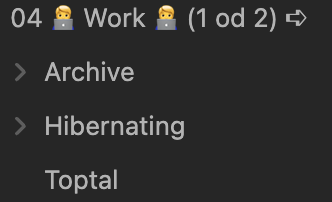
Indexing only, with one entry per work area. Archive, Hibernating and Active. (Currently ‘1 od 2’ just Toptal in there, as my full-time contract ended recently.)
05 🦸♂️ Sidequest🦸♂️ (1 od 1) ➪

Indexing only, much like work. Sidequest is in fact work-like activity, and there’s a cap/WIP limit at 1.
06 🎓 PhD 🎓 (2 od 2) 📁
Grouped per subject per year and generally in folders by context.
Messy as each subject has multiple files, and I use multiple tools (e.g. Word, Google Docs and Colab, GitHub, email communication etc.)
07 🌍 Languages 🌍
01 Macedonian, 02 Norwegian, 03 Hebrew.
The number isn’t alphabetical and it isn’t a schedule. It’s the honest ranking of how much of me each language gets right now. When the week compresses, it compresses from the bottom.
Sorting is the decision. Once the folders are ordered, I never re-litigate which language to open.
How AI gently works with me
I have a few scheduled daily jobs
- 07:00 daily note creator. Creates today’s daily note from a template: 2 stones, categorized tasks for the day (including items carried over from yesterday and fetched calendar events), and space for the evening journal.
- 07:50 daily briefing. Messages me on Telegram, in Serbian: today’s tasks by tag, today’s events, yesterday’s mood in one line. Once. It’s explicitly forbidden to nag later.
- 08:00 two stones. Asks for my 2 stones for the day.“Jutro! Koja su tvoja 2 kamena za danas?” Waits, then writes my response into the Obsidian note (.md file).
- 22:35 evening journal. Four questions, one at a time: what gave you energy, what took it, what was your mood, three things you’re grateful for. If I answer “skip”, it skips. It writes to the file only once it has everything.
Besides scheduled daily jobs, I have activities like ‘talking’ with my data (e.g. ask Claude how my mood was in the last 30 days and if it sees any patterns related to tasks; or what takes my energy most often). I also keep skills and readme on myself in SYSTEM.
Notice that AI doesn’t decide anything. Doesn’t rewrite my priorities, reorder my board, or even tell me I’m behind. Three of the four jobs are a well-timed question with somewhere to put the answer.
That’s the “gently” part. The AI does the tedious half: assembling, carrying forward, reading the calendar, tallying the week, keeping the format consistent so future-me can parse it. The judgment stays mine. That’s not only philosophy: an agent that quietly reorganises your life (still) produces a vault you no longer trust, and a vault you don’t trust is worse than no vault at all.
Experimentation / future plans
What I want to try next, roughly in order of how much I believe in it:
- Re-build reviews as cron jobs. Having daily journaling through Telegram (Openclaw), made me almost never miss a day. I want to do the same with weekly and monthly reviews.
- A WIP auditor. A weekly job that counts the actual files in each folder, compares them to the
(x od y)in the name, and tells me where I’m lying to myself. Today the limits are honour-system. - Hibernation expiry. Anything untouched in a
Hibernating/folder for 90 days gets one Telegram question: revive, archive, or drop. Hibernating should be a conscious choice. - Tracking beyond done/not-done. Delay ratio per tag, time from active to archive, streaks on the language folders. Two years of daily notes exist and almost none of that signal is being read.
- A proportionality check on the languages. The folders claim Macedonian > Norwegian > Hebrew. Do the actual entries and set priorities agree?
- A pre-meeting brief from the Life Library. Before a call, the agent drafts or updates that person’s note from the calendar entry and past meeting notes. My people notes are two lines because writing them is friction, exactly the friction worth handing over.
- Proposals instead of edits. AI to propose and let me accept or reject on review. More autonomy is only safe with a bigger undo button.
- (Voice) capture notes into an inbox. Half my good ideas happen while walking, and they currently die there.
- More of it running locally. Am I comfortable with Anthropic handling data as sensitive as my journal? I don’t know.
And one I keep circling without committing: letting an agent do the review’s reflection, not just its arithmetic. It could certainly spot patterns across three months of energy notes that I can’t see from inside them. But the value of a review is partly the sitting-with-it. If I outsource the noticing, I’m not sure what’s left. Undecided… which is its own honest answer.
Featured image generated with GenAI
Yes, I let Claude and Gemini each help me write this article based on my vault/notes.